
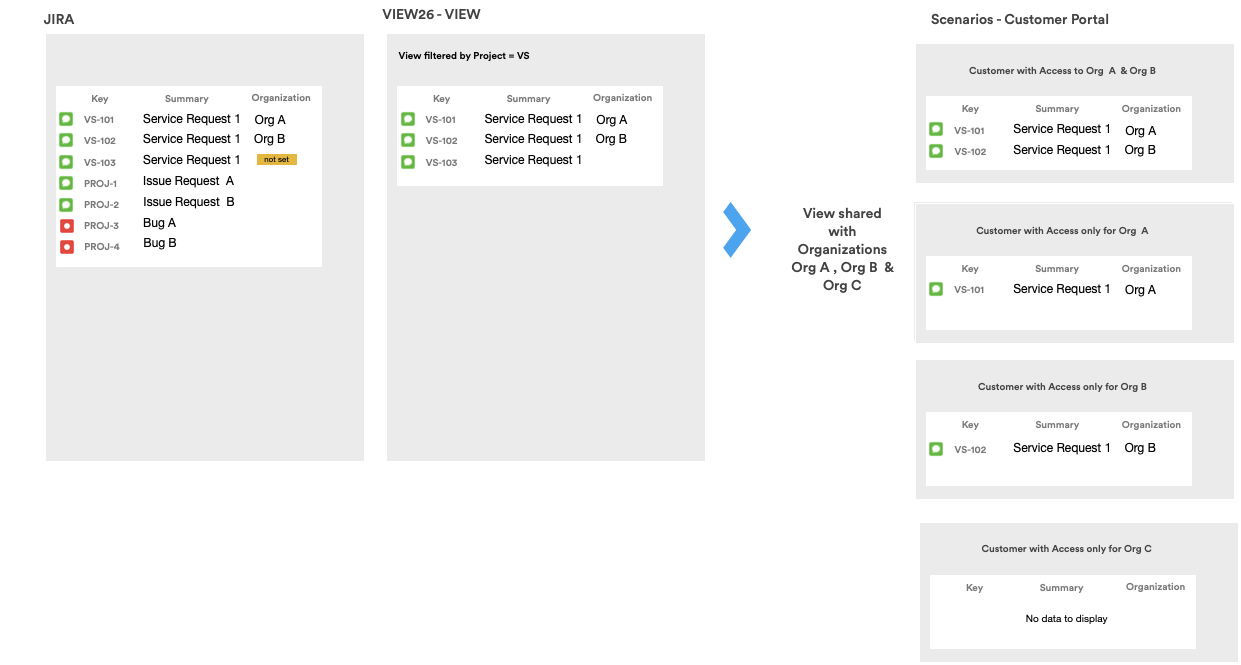
When a View is shared with a customer using the Share with Organizations feature, the issues/service requests displayed are filtered in accordance with this individual customer’s membership of the relevant Organizations.
Video: Check different ticket counts in portal reports
Check organization sharing, customer membership, request organization values and report scope, then retest as the customer. Also review Access Controls: Management Organizations and Internal Issue Sharing can change the audience and visible data.
Watch time: 1:29. The demonstration uses fictional service desk data.
Watch Check different ticket counts in portal reports on YouTube (captions and playback controls)
A customer may only view the issues which are shared with the Organizations they are assigned to.
Issues which are not tagged with any Organizations are not displayed in the View.
Take a look at the example below for clarification:
Related articles