
Share a reporting view with a customer organization and check the portal experience.
Jira Customer Organizations are groups of customers that you can add to multiple projects. Customers can be members of multiple organizations.
Video: Share reports with customers in the portal
Follow the customer reporting workflow: scope a view, share it with an organization, and check the report as a portal customer. Your administrator controls the available portal filters.
Watch time: 2:13. The demonstration uses fictional service desk data.
Watch Share reports with customers in the portal on YouTube (captions and playback controls)
To Share a View with a Jira Customer Organization (External stakeholders) :
1. Select and enter the View you want to share from the Manage View / Charts and Reports Home Page
2. In the top tool panel of the View select the Share icon
3. Click with Organizations tab
4. Type in the box to search and select the name of the Organization you wish to share the report with
5. Click Save to confirm
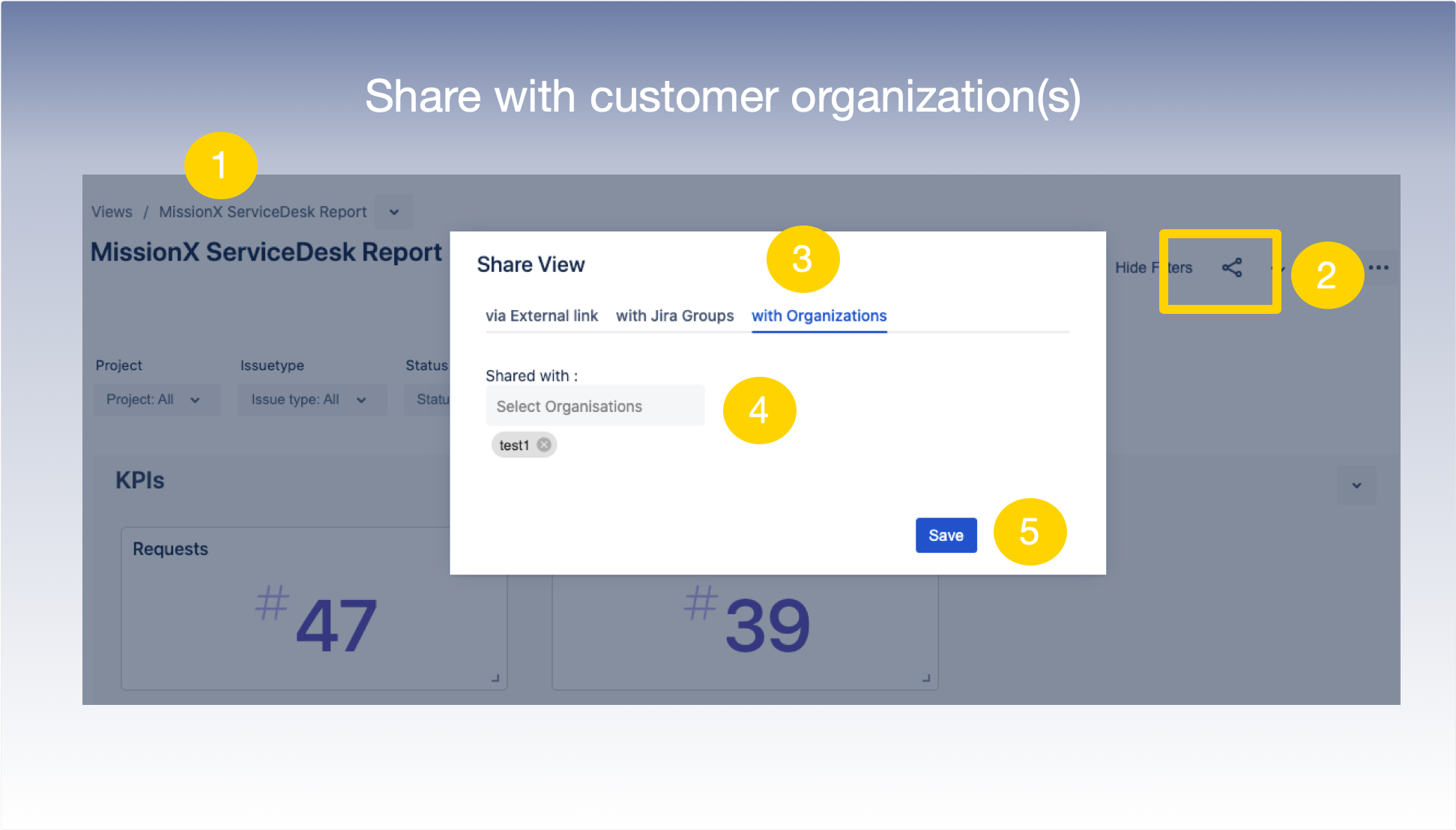
6. The View shared would now be Published in the Jira ServiceDesk Customer Portal .
VIEW26 Charts & Reports allows you share reports with external customers via the JIRA ServiceDesk Customer Portal (https://XYZ.atlassian.net/servicedesk/customer/portals where XYZ is your domain) - providing self-serviced, real-time transparency.