
Jira administrators choose which projects Attachment Manager shows. Open the settings from Jira settings (the cog icon) → Apps → Attachment Manager. The page has four tabs: Labels, Projects, REST API and About.
Choose tracked projects
A tracked project is one the app reads. Reading a project's list of attachments is called indexing.
-
Open the Projects tab.
-
Turn Tracked on for each project whose files should appear in the app. Indexing starts by itself.
-
When Status says Indexed, the project's files are ready. Large projects take longer.
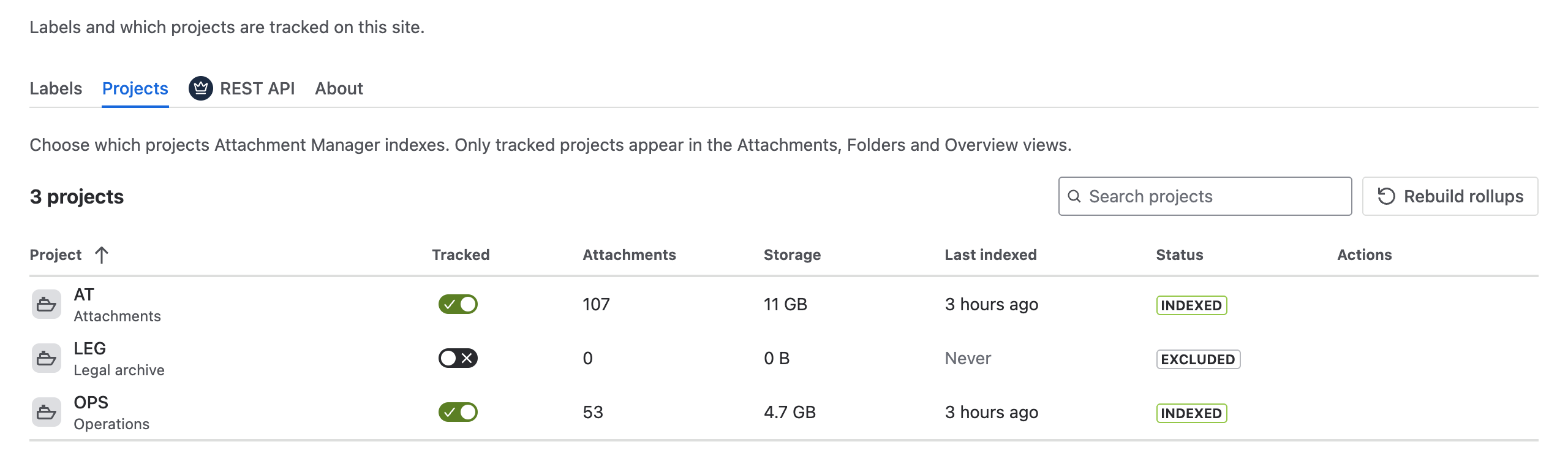
|
Status |
What it means |
|---|---|
|
Pending |
The project has not been read yet, for example because it was created after the app was installed. Select Index now. |
|
Indexing |
The app is reading the project's attachments. |
|
Indexed |
The project is ready. |
|
Paused (storage) |
The app keeps its list of your files in a storage area of its own, and that area is nearly full. Your Jira storage is not affected. Read the warning below, stop tracking projects you do not need, then select Retry backfill to read the project again. |
|
Excluded |
Tracking is off for this project. |
|
Failed |
Reading the project did not finish. Select Retry backfill to read it again. |
Turning Tracked off removes the project's files from the app, permanently removes the labels on those files and takes the files out of folders. The files themselves stay in Jira. Tracking the project again does not bring the labels back.
Refresh summary data
Counts and storage figures are updated every night. To update them now, select Rebuild rollups; it recalculates the figures shown on Overview.
Other settings
-
About tab: choose your Jira plan so Overview uses the right storage allowance. See Overview and storage reporting.
-
REST API tab: see REST API — setup and usage.
-
Missing or old data: see FAQ and troubleshooting.