
The Overview tab shows how much storage your attachments use, where it sits and how it is changing. Use this dashboard to find what to clean up and free up space. Open it from Apps → Attachment Manager, then pick the projects to include with the project chooser at the top of the tab.
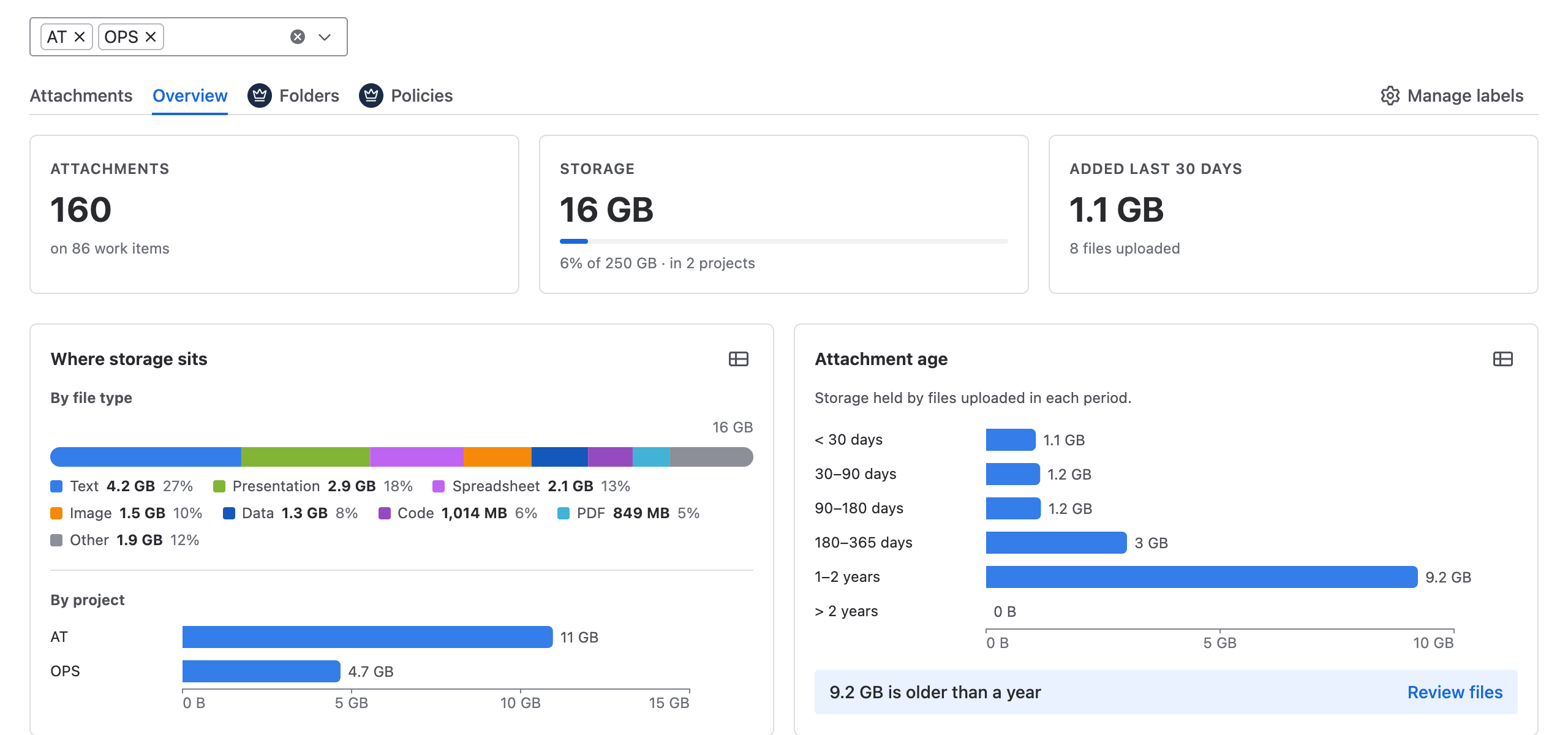
Read the reports
|
Section |
What it tells you |
|---|---|
|
Attachments, Storage, Added last 30 days |
The totals for the projects you chose. |
|
Where storage sits |
Which file types and which projects use the most space. Select a project to see its files. |
|
Attachment age |
How much space old files take. Review files lists the files older than a year, largest first. |
|
Uploads per month |
How uploads change over time. |
|
Top labels and Top uploaders |
The labels used most, and the people who upload most. |
|
Largest files |
The biggest files, which you can label, download or delete from here. |
Every chart can also be shown as a table. Uploads per month can show Count or Storage.
Set the storage allowance
Jira does not tell apps how much attachment storage your site has, so a Jira administrator sets it once:
-
Open Jira settings (the cog icon) → Apps → Attachment Manager → About.
-
Under Site storage allowance, choose your Jira plan: Free (2 GB), Standard (250 GB), or Premium or Enterprise (unlimited).
-
Select Save.
Check how fresh the numbers are
Labels change straight away. Counts and storage figures are updated every night, so check the As of time under the reports.
Related pages